Showing posts with label Production Log. Show all posts
Showing posts with label Production Log. Show all posts
Tuesday, 4 February 2014
Project log 04/02/14 (progress on my products)
At the moment I am working on fixing my blog and making sure it is up to date and organised. For example, I have added descriptions where they have been needed on certain documents I have uploaded onto my blog, like the drafts of my products. I realised that for some, I hadn't explained properly what changes I had made to them and how I plan to improve them, so I did all of this today. Also, whenever I've been in school I have been working on all of my products; especially my music video and digipak. On my digipak I re-did the sparkles underneath the masthead to make them less blurry and look more professional, and I changed the filter of the main image a tad, to the one I liked best. Also, on my music video I have been working really hard to shorten shots down to make them suit the pace of the song more and be less tedious to watch. To do this, I set 'marks' on the timeline of my music video to basically mark each beat of the song to end each shot to, so that it has a good pace and rhythm. After watching each part I'd done back, I noticed it looked so much better to watch and a lot more professional. I realised that too many of my shots were too long, so I've definitely changed a lot of this and will be doing more so as I go on. I have also changed the filter on my 'gymnastic black and white shots' into a subtle light pink filter. I believe this looks so much better as the light pink is a lot more subtle and professional, and also pink connotes passion and love, so it represents very well. In my eyes sometimes black and white is too corny and doesn't look very professional, so I knew I needed to change this. I will be continuing to work on all of my products throughout the week. I have also started one of my evaluation questions, so I will be continuing to work on this too.

Thursday, 16 January 2014
Project log 16/01/14 (analysing the results of my peer assessment)
Transcript:
Today in class, we all had to present the first or second
drafts of our music videos. Then, we had to ask a few questions to our class
members. I asked questions such as “what did you make of the narrative of my
music video, did you understand it?”, “did the mise-en-scene suit the genre of
the song?” and “what are some potential improvements you could give me?”. I received
feedback from Ciaran for example, who said that my music video was really
understandable and the narrative was clear. Then, we handed out sheets which
everyone had to fill out. They asked questions based on the editing of my music
video, the filming etc.. My peers had to give me a level on each of the aspects
given, which was based on a level sheet which states what each level means.
Some of the constructive criticism feedback I received was that I should cut
some of the shots more as some of the shots are too long and that I should fix
the blurry shots, and that I should also colour correct some shots. However,
some positive feedback I received was that the narrative was clear and that the
mise-en-scene fits in well with the genre for example. I was really pleased
with the feedback I received. Then, I received feedback from my teacher, who
said that she really liked my music video and that the narrative was clear and fluent;
however the only thing she’d change is the ending shot where Georgina laughs
and smiles on the last lyric. She said that this confused her as the majority
of the music video consisted of Georgina being upset, and that the whole video
made sense apart from this shot, so I should change it. Ciaran said that I
should perhaps fade the last shot into white. I will definitely take all of
this advice on board and I would say that this feedback session has really
helped me as I have the feedback on paper and can refer to it whenever I like
which will really help me in making my music video the best I possibly can. I
plan on putting all of this data onto a pie chart soon so that I can summarise
my feedback properly.
Wednesday, 18 December 2013
Project log 18/12/13
Transcript:
Today is the deadline for my music video, my digipak and my album advert. So obviously I need to have all of my coursework done and I think I've done this quite well, I've got everything done on time and I also feel I am quite organised with everything. But at the moment I'm just updating my blog and making sure everything is as it should be, because I know there's quite a few things that I needed to add to my blog. For example, some of my project logs didn't have transcripts and stuff like that, so it was just little things that I felt I needed to update. I'm quite happy with my music video but obviously knowing that it's just the teacher deadline today I will be making a lot more changes to all of my coursework, to make sure that I'm capable of getting the best grade I can. I'm just going to keep on making improvements.
TO DO: (15/12/13)
TO DO:
- finish raw footage of performance
- do raw footage of gym shots
- do video project logs that I haven't done
- do some more alterations on video etc
- do descriptions for all drafts/finals
Sunday, 15 December 2013

Friday, 13 December 2013
Project log 13/12/13 (whilst taking Digipak & album advert photos)
This is a project log I filmed with my actress/model half-way through taking all of the photos I need for my Digipak and album cover. It was a successful session.
Transcript:
At the moment we're just taking the photos for my digipak and my album advert. So we're just in the woods at the moment, and it's actually going quite quickly. I've taken the front cover photos for my digipak at the moment and I've made sure that I've taken quite a variation of different shots so that I have quite a lot to choose from. Now I'm just going to take the rest for my digipak and my album advert. Hopefully I can get all of this done, then over the weekend I plan on downloading Photoshop and starting to edit these so that I have them ready for my deadline on wednesday.
Thursday, 12 December 2013
Friday, 6 December 2013
Wednesday, 4 December 2013
Project log 04/12/13 (convert into video)
Transcript:
Over the past week I have been working really hard on creating my actual music video. I have been using Adobe Premiere Pro, cutting many of my shots, fitting them into place and adding special effects etc to get the look I want. It has been quite hard to fit everything in, as I have been having to create summaries of my raw footage so far etc aswell as making this music video, but I have made sure to work extra hard and fast to ensure all of these tasks are complete, which has required a crucial time management skill.
So far, I am nearly finished completing the rough cut of my music video, and after completing the summary of my raw narrative footage, I understand I now need to begin creating a summary of my raw performance footage.
Other things I know I need to do is return to Ruislip woods with my actress/model, Georgina, and take digipak photos. My Canon 550D camera stopped working whilst beginning to try take photos for my digipak on the filming day for the performance shots a few weeks ago, so I will definitely try to do this soon. Then, this will allow me to begin editing my digipak properly.
So far I feel quite up to date and organised with all of my work. The fact that I have nearly finished my rough cut of my music video makes me feel a lot better as it means I have finished it early and can begin starting on my evaluations and other coursework that I need to complete before christmas.
INSERT CAM STUDIO VID OF ME EDITING MUSIC VIDEO
Thursday, 21 November 2013
Project log 21/11/13
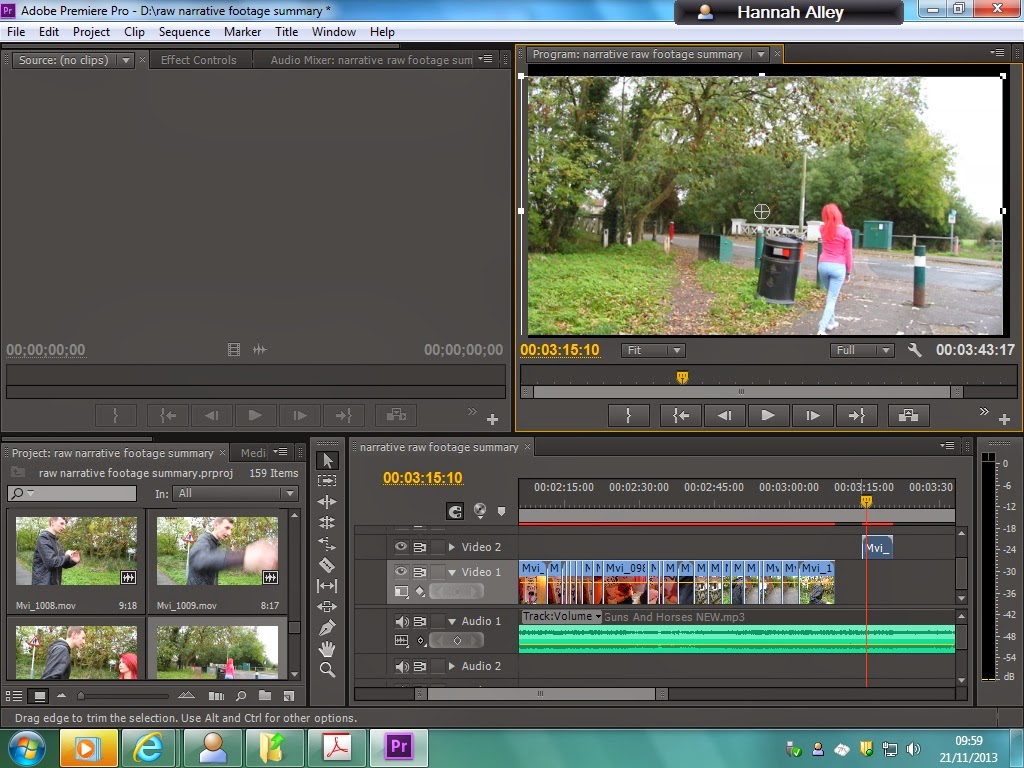
This week I have started editing my music video at school on a program called Adobe Premiere Pro. I uploaded the clips I have filmed so far on the narrative-side of my video, and put them together. I feel it is going fairly successful so far, however it is hard to tell where to put what clips in what places because I have not filmed my performance shots yet.
Today and yesterday specifically, I began creating another file on Adobe Premiere Pro, summarising the footage I have filmed so far narrative-wise. I tried to export it today but I did not have enough time so I am going to export this and upload it to YouTube hopefully on Monday.
Tomorrow I am filming my performance shots with my actress Georgina, in Ruislip Woods.
Print screen photo of the process of me editing my music video narrative footage summary:
I also created a "photos of me filming" video on Windows Movie Maker at home, as this I believe is a strong piece of construction evidence.

After this, I developed a Word document on a brief planning of the structure of the filming of my music video tomorrow. Therefore now I feel a lot more organised because I know what I am filming for what parts, so I found this particularly helpful. Then, I completed the "alterations/evaluations I have made along the way" task on my blog, listing the alterations I can remember making along the way, with rough estimations of the time these alterations occurred and a description of the alterations, why they happened and how it affected my work. I actually found this task really insightful, showing me how far I have come so far.
Monday, 4 November 2013
Project log 04/11/13 (MAKE INTO VIDEO?)
Transcript:


Today, I created a "costumes" video on Windows Live Movie Maker. I had previously created a costumes video before, but of course now I have filmed a lot more footage, there have been many more costumes to add, so I started again. This video included every single costumes my actor/actresses used in my music video, the reason why and what effect it will have on the audience. I figured this would give the examiner or the audience a good insight into my motives and reasons for creating the look I did in each shot. I have uploaded this to YouTube and embedded it onto my blog, however I will be adding to this costumes post as I still have more filming to do on the performance-side of my music video. Furthermore, I have tidied up my blog, making sure that every post is named under the right label. I found that some posts had been labeled as "Planning", when they were just construction evidence etc., so I made sure to fix this. After this, I began Googling similar images to what I want my Digipak front cover and album advert pictures to look like, to give me some inspiration for how to construct my own. I put these onto a Powerpoint and explained why I want to use some of them. I thought this was a good idea as it also shows the examiner the progress with thought I am making, and some construction evidence.
Screenshots of the process of editing and uploading my "costumes" video:


Screenshot of the process of me creating my image inspiration ideas for my Digipak cover and album advert:

Sunday, 3 November 2013
Thursday, 31 October 2013
Project log 31/10/13
Today, I have been filming all day at various locations for my music video, such as: Georgina's home, Elmbridge close, the alley-way near Coteford Infant school, The Fairway restaurant and more. I have completed filming all of the narrative shots for my music video which I am so pleased about, and now I only have to film my performance shots of Georgina in the woods, which will be done on Monday since both me and Georgina have half-days on this day. Since returning home today, I have also created a picture location video on Windows Movie Maker, as I took many photos of the locations today. I uploaded this to YouTube and embedded it onto my blog. I feel as if today was a really productive, successful day. Below are some photos of me filming today.


Furthermore, here is also a photo of the notes I created before I began filming. I produced these notes so that I was clear and organised on how I wanted today to be structured:
Friday, 25 October 2013
Friday, 18 October 2013
Project log 18/10/13
Transcript:
This is my project log for the 18th October 2013. Today I've just basically been doing a lot of my research tasks, and yesterday I was off school ill so I've just basically been using my time wisely to finish off my research tasks and I've managed to finish all of them so I'm really pleased about that as it means I can now get ahead with my music video. I've completed my risk assessment which was quite a helpful task because it helped me establish all of the different health and safety issues I might have with my music video and how I can prevent these from happening. Also I've done an analysis of a previous A2 music video, so that's just basically made me look at different ways in which students have made their music videos successful and I have analysed Roberto's, so that was quite helpful. I have finally uploaded my storyboard also, but I've basically changed all of my ideas for my music video now so it means that I'm going to have to re-do my storyboard again at some point, but I have uploaded this original storyboard. The new ideas I have for my music video are that it's still going to be half narrative, half performance-based and it's still going to be the same song. But I'm just going to use my actress walking through the woods and then she'll pick up different props that will be in her pathway, and each time she picks up a prop it will merge into a flashback that relates to the prop. The narrative part will basically be "5 stages of a relationship", and it will be her previous relationship with her ex-boyfriend. It will show flashbacks of each stage, e.g the heartbreak stage, the comfortable stage, the nervous/excited/early stage, and each prop will link to each stage. However, the audience will not know until the end that the props are actually a figure of the girl's imagination because she is experiencing almost post-trauma from her break-up as she is heartbroken. So that is my idea which is going to be quite hard to do, but I think it will work if I put a lot of work into it. I have also done voki creations of my actors that I'm going to be using, so I've basically just done a brief outline of what sort of people my actors are and things like that just to give the audience an insight. I have also done the "influence of music genre" task. I have re-done my lyric annotations because I felt as if my previous lyric annotations were not as great as they could be, so I have re-done them on a word document so that they look a lot better. Also I have realised that my picture mood-board that I completed quite a while ago isn't really that great, it could have a lot more work done to it, so I've started creating a mood board video instead, which is being created on Adobe Premiere Pro. I've completed this but there's been a few technical difficulties with that because it's not exporting so I'm going to have to ask the teacher about that. Also, I have added alterations to quite a lot of my previous tasks because obviously I have changed quite a lot of my ideas now to a completely different concept of my music video, so of course I need to inform the examiner that there's been a lot of changes and what changes have been made.
I also filmed on Wednesday and I got several first shots for my narrative done for Georgina and Matt. The majority of the shots were done in Georgina's room, so I basically almost finished the "first stage" of the relationship, which was the nervous/excited stage of the relationship. This is where I filmed shots of her getting ready, throwing clothes around, doing her make-up and things like this. I also filmed the "first time they met" and went on a date together. Georgina has a bar in her back garden so I filmed them in the bar together, but I used a certain angle so that it looked professional. I attempted to film that but the camera ran out of battery so I will have to continue that soon. However I am quite pleased with the shots I have filmed so far and I plan on continuing to film hopefully next Wednesday because that's the next time Matt has off work, so hopefully I can get the majority of my filming done then. Then on the performing-side of my music video, I will be doing a lot of them shots with just Georgina so that she does not get distracted by Matt, and I will most likely be filming them next week some time.
Wednesday, 16 October 2013
Monday, 14 October 2013
Project log 14/10/13
Today was actually a really interesting lesson because I have walked out of it with a different mindset towards my music video. Our exam media teacher wasn't in today, so instead of going home I stayed for the two periods and used my time wisely, completing coursework. As I did this coursework I was thinking about the concept of my music video and its storyline, and realised that actually the storyline might be quite boring for the audience as there isn't a massive anticipated climax. So, I asked a teacher Mr Fisher on what his opinion was on my ideas and how I could improve him, and he helped me a lot as he gave me many great ideas to play with. A few of these ideas were:
- rewind the narrative. Start from the end, end with the start
- use props as a main aspect to the music video. For example, do a narrative where a girl is walking through her room and as she picks up each prop, it links back to a flashback that relates to it of her and Matt's relationship
- do a music video where it shows Georgina's 'split personality' - 3 sides to her personality = 3 different people. So, her in different costumes showing a different personality, and how she reacts to her and Matts' relationship is different in each
I have taken deeply into consideration these ideas and am now looking to really think about my song carefully and see how I can incorporate a few of these ideas to make my music video's storyline better. At the end of the day, the main aim of my music video is to engage the audience, and if I feel like I am not going to do this with my current ideas for storylining, then clearly I will improve this as much as I can to fit the aim.
After thinking a bit about this, I might try and re-do a whole storyboard again to give me a clear view of what shots I need to use etc so that I am not confused and disorganised on the scheduled filming days. However, in this case I need to make this storyboard soon if I'm going to as I have scheduled to film soon this week.
Tonight I also plan on completing all of my research tasks and clearing up my blog.
Progress report video 10/10/13
This is a progress report video I was filmed presenting on the lesson of the 10th October. I basically just showed some aspects of my blog to the class, showing how far I have gotten/what progress I have made. I then imported this video onto Adobe Premiere and added some pictures/examples of what I am talking about to make the presentation a lot more interesting. Then I exported the video and uploaded it onto YouTube, then embedding it onto here.
I found this task particularly helpful because it actually showed myself how far I have gotten and how much work I need to do. It also allowed me to see other people talking about the progress they have made so far, which motivated me even more so to do more work and get to where I want to be in this project.
Thursday, 10 October 2013
Project log 10/10/13
Today I have not been in school, so I have taken it upon myself to do some work on my music video. I wanted to test what the slow motion effect and black and white effect would look like on some of the artistic shots I created of my actress Jessica doing her gymnastics, and what the outcome would be, for example whether it would look professional or not. So, knowing that of course I would not be editing my final music video on Windows Movie Maker, I was at home and decided to use simply Windows Movie Maker to test some effects on some of these shots, just to make some progress. I have uploaded the contents to YouTube and embedded it here, just to show what it looks like. Overall I am quite impressed with the results as I believe the effects make the shots look quite artistic, and now I know what some of them will look like in my final music video.
After this, I also put together the pieces of raw footage I have of the locations for my music video and uploaded them. Then I also uploaded the pictures I had taken of the locations.
Overall I think today I have made quite a lot of progress as I have now got an idea for what my music video will look like, what improvements I need to make and how I will do this.
Furthermore, after this I decided I really wanted to test some of my first shots with the soundtrack on Windows Movie Maker just to see what it looks like and how it pans out. It actually worked out quite well, however I know that some shots are quite shaky, the cropping and timing could be better, and I could improve the colour and quality of some as they do not all match and some are quite blurry. However of course this was just a test and I will be improving on all these aspects when I have filmed everything and finally begin to start editing them all on Adobe Premiere Pro.
After this, I also put together the pieces of raw footage I have of the locations for my music video and uploaded them. Then I also uploaded the pictures I had taken of the locations.
Overall I think today I have made quite a lot of progress as I have now got an idea for what my music video will look like, what improvements I need to make and how I will do this.
Wednesday, 9 October 2013
Project log 09/10/13
Today in lesson, I finished working on my script which I was very pleased about because now I feel a lot more organised. The only problem was that I couldn't upload it to Scribd, so I tried a website called Issuu and it didn't work on here either, and then I tried creating an account on SlideShare but this wouldn't work either. So I figured I would have to go onto my school account through Haydon WebLinks when I get home and upload it from my home computer. The previous lesson, we as a class all recorded us individually performing a progress report to the class, showing how far we had gotten with our music videos and what we had done on our blogs. So, today I imported my video to Adobe Premiere Pro and began working on this, adding pictures and effects, etc., but soon this coursework lesson was over.
Now I am home, I have uploaded my script to my blog, aswell as my filming schedule which I uploaded onto SlideShare after I created an account on it because I want to use more different presentation techniques, and I also took it upon myself to create a video on Windows Movie Maker about the costumes I used for my actors in the filming of my music video. I uploaded this to YouTube and embedded it onto my blog. I thought this was great progress I have made because creating this video enables the audience to have an insight on what my motives were behind creating my actor's/actresses' looks.

I am just having a look at my A2 checklist now, to find that I have only two more research tasks left to complete, and a few more planning tasks which I have already started. You can see this below:


Subscribe to:
Posts (Atom)